








We are excited to announce RadarSimApp, a cross-platform desktop application that brings the full simulation power of RadarSimLib into an intuitive graphical interface. Whether you are a radar researcher exploring new waveform designs, an RF engineer validating system parameters, or a student learning the fundamentals of FMCW radar, RadarSimApp lets you model, simulate, and visualize radar system performance — without writing a single line of code.
Why RadarSimApp?
RadarSimX has long provided RadarSimPy and RadarSimM as powerful programmatic tools for radar simulation. These tools are widely used in research and engineering, but they require users to be comfortable with Python or Matlab APIs. RadarSimApp bridges that gap.
The same high-fidelity simulation engine — the same ray tracing, the same baseband model, the same Range-Doppler processing — is now accessible through a clean, point-and-click interface. Configure a complete FMCW radar system in minutes, run the simulation with one click, and immediately inspect the results interactively.
What Can You Do With RadarSimApp?
Model a Complete Radar System
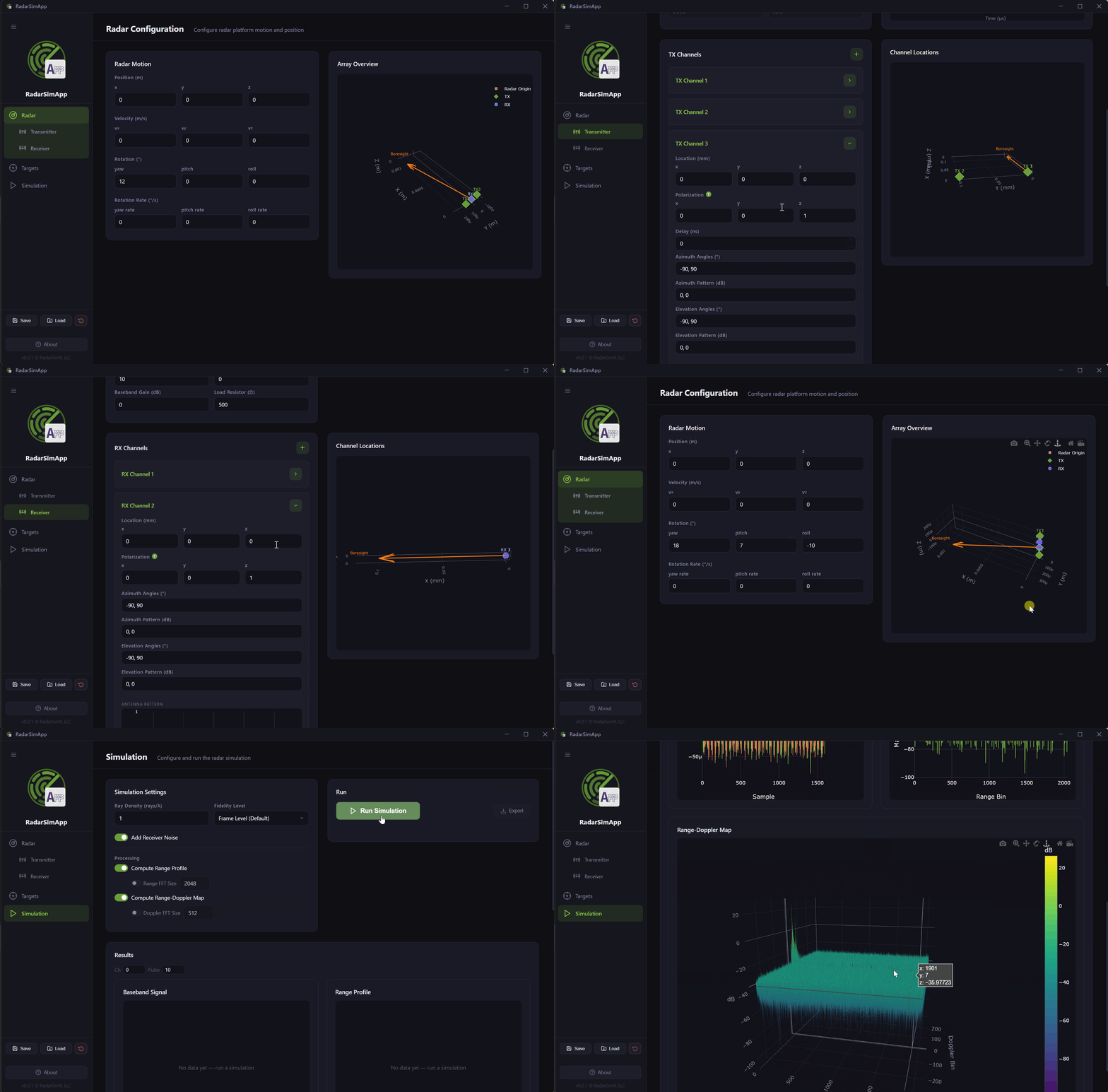
RadarSimApp organizes radar configuration into four focused panels:
- Transmitter — Set the start and end frequency, sweep timing, number of pulses, pulse repetition period, and TX power. Add multiple TX channels with individual antenna patterns and spatial offsets to model MIMO or phased-array architectures.
- Receiver — Configure the sampling rate, baseband type (complex I/Q or real), noise figure, RF gain, baseband gain, and load resistance. Add multiple RX channels with antenna patterns to match your hardware.
- Radar Platform — Define the position, velocity, rotation, and rotation rate of the radar body in 3D space, enabling simulation of moving platforms such as automotive or airborne radars.
- Targets — Place any number of point targets (position, RCS, radial speed, initial phase) or load 3D mesh targets from STL files with full 6-DOF motion parameters.
Interactive Results
After the simulation completes, results are displayed as interactive charts:
- Baseband Signal — real and imaginary components per channel and pulse
- Range Profile — 1D FFT magnitude with configurable transform size
- Range-Doppler Map — 2D FFT heatmap with configurable Doppler FFT size
Use the channel and pulse index selectors to step through the full baseband dataset. All plots are zoomable, pannable, and exportable directly from the browser renderer.
Save, Load, and Export
Configurations are fully serializable. Save your entire radar setup — waveform, channels, targets, and simulation settings — to a JSON file and reload it later or share it with colleagues. Simulation results can be exported to HDF5 or JSON for post-processing in Python or MATLAB.
Under the Hood
RadarSimApp is built on Electron, combining a native desktop shell with a web-based renderer. The simulation backend is RadarSimLib, a native C library that runs the same high-performance ray-tracing engine used by RadarSimPy. The bridge between the JavaScript frontend and the native library is handled by koffi, a zero-dependency FFI library for Node.js — no Python runtime, no compilation step required at runtime.
Note: RadarSimApp is in an early phase and currently only supports Windows. macOS and Linux support are planned for future releases.
Getting Started
Download the pre-built Windows installer from the GitHub Releases page.
Already have a RadarSimPy license? You can use your existing RadarSimPy license file to unlock the full capabilities of RadarSimApp — no new purchase required.
The unlicensed version is fully functional for evaluation and education, but some advanced features are limited until a license is activated.